Introduction
On November 11 2021 I put trying out tailwindcss on my personal TODO list.
In January 2024 I got around to trying out tailwindcss on a react.js web application and this blogpost first describes how I used it and then what I think about it.
The application used in the tailwind test
The test bed for trying out Tailwind CSS was my smallest real application, handlereg. This is an application for tracking grocery purchases. What’s tracked for each purchase is the date, the store and the amount.
Before trying out Tailwind CSS, the application was styled with Bootstrap v5 (and just recently upgraded from Bootstrap v4).
Here is the main page of the handlereg webapp styled with Tailwind CSS. 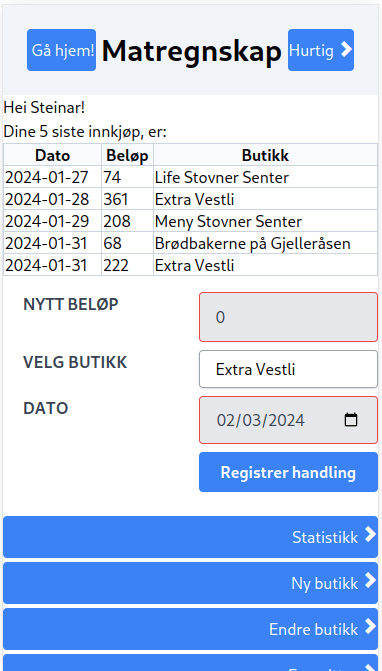
How to tailwind
Tailwind CSS isn’t, like bootstrap, a CSS stylsheet that can be packaged up and served as a static file, that is then referenced from HTML files.
With Tailwind CSS one needs to run a piece of JavaScript code that scans HTML files, or whatever is used to deliver HTML (e.g. PHP, JSX, etc.), for the contents of the class attribute of HTML elements, and then uses what it find to generate the actual CSS style sheets delivered with the application.
Note: In JSX the attribute is name “className” instead of “class”, but in the DOM rendered in the web browser the attribute will be named “class”.
The HOWTOs I googled up described how to run that piece of JavaScript code from various build systems.
The webapp used for testing used JavaScript-based webpack to build the frontend, so the changes needed to use Tailwind CSS, consisted of:
-
Add npm dev depdencies (dependencies used for build but not added to the generated runtime) for the packages postcss-loader, tailwindcss and autoprefixer
--- a/handlereg.web.frontend/src/main/frontend/package.json
+++ b/handlereg.web.frontend/src/main/frontend/package.json
@@ -49,12 +49,15 @@
         "@babel/eslint-parser": "^7.23.3",
         "@babel/preset-env": "^7.23.7",
         "@babel/preset-react": "^7.23.3",
+        "autoprefixer": "^10.4.17",
         "babel-loader": "^9.1.3",
         "css-loader": "^6.8.1",
         "eslint": "^8.56.0",
         "eslint-plugin-react": "^7.33.2",
         "eslint-webpack-plugin": "^4.0.1",
+        "postcss-loader": "^8.0.0",
         "style-loader": "^3.3.3",
+        "tailwindcss": "^3.4.1",
         "webpack": "^5.89.0",
         "webpack-cli": "^5.1.4"
     }
-
--- a/handlereg.web.frontend/src/main/frontend/webpack.config.js
+++ b/handlereg.web.frontend/src/main/frontend/webpack.config.js
@@ -29,7 +29,7 @@ module.exports = {
             },
             {
                 test: /\.css$/,
-                use: [ { loader: 'style-loader' }, { loader: 'css-loader' } ]
+                use: [ { loader: 'style-loader' }, { loader: 'css-loader' }, { loader: 'postcss-loader' } ]
             },
         ]
     }
-
Add a postcss config file (postcss.config.cjs) that runs the plugins tailwindcss and autoprefixer
const tailwindcss = require('tailwindcss');
const autoprefixer = require('autoprefixer');

module.exports = {
  plugins: [tailwindcss('./tailwind.config.cjs'), autoprefixer],
};
-
module.exports = { content: ['./src/**/*.js'], theme: { extend: {}, }, variants: { extend: {}, }, plugins: [], } -
Finally add some CSS at-rules for tailwind to a CSS file loaded by the webapp frontend, src/App.css in my case, which is imported into App.js (I have no idea what these at-rules actually do, but “monkey see! monkey do!”…)
@tailwind base;
@tailwind components;
@tailwind utilities;
After the changes to the build were in place, I added classnames conforming to Tailwind CSS to the JSX code in the react components and the used classes were added to the CSS loaded by the webapp.
What did I think about it?
In short, Tailwind CSS succeeded in styling the webapp at least as well as it was styled with bootstrap, but I probably won’t continue to use Tailwind after this experiment.
The main reason I won’t continue using Tailwind, is I think long className attributes like e.g. the className attributes of the forms elements shown below, clutter up the code and makes it hard to read:
<form className="w-full max-w-lg mt-4 grid grid-flow-row auto-rows-max" onSubmit={ e => { e.preventDefault(); }}> <select className="block appearance-none w-full bg-white border border-gray-400 hover:border-gray-500 px-4 py-2 pr-8 rounded shadow leading-tight focus:outline-none focus:shadow-outline" size="10" value={valgtButikk} onChange={e => dispatch(VELG_BUTIKK(e.target.value))}> { butikker.map((b, indeks) => <option key={'butikk_' + b.storeId.toString()} value={indeks}>{b.butikknavn}</option>) } </select> <div className="columns-2 mb-2"> <label className="w-full ms-5 block uppercase text-gray-700 font-bold" htmlFor="amount">Butikknavn</label> <input className="appearance-none w-full bg-gray-200 text-gray-700 border border-red-500 rounded py-3 px-4 focus:outline-none focus:bg-white" id="amount" type="text" value={butikknavn} onChange={e => dispatch(BUTIKKNAVN_ENDRE(e.target.value))} /> </div> <div className="columns-2 mb-2"> <div className="w-full"> </div> <button className="w-full bg-blue-500 hover:bg-blue-700 text-white font-bold py-2 px-4 rounded" onClick={() => dispatch(BUTIKK_LAGRE(butikknavn))}>Lagre endret butikk</button> </div> </form>
Also, Tailwind class names are in effect a DSL for writing CSS style sheets and I can’t help thinking “isn’t CSS enough for CSS? Is another language for CSS needed?”.
 Steinar Bangs blogg